Be attorneys and judges, not software technicians.
Open the full record, search every page, and annotate any document in seconds. AI suggests — people decide. Every suggestion stays in the record.
Shown on a fully synthetic claims file — no real veteran data.
How it works
One platform across every stage of the case.
The case enters once. The platform carries it end to end — on one record everyone reads from.
- 01 — Intake
The record arrives.
An unlabeled PDF or an upstream feed is auto-segmented into typed, dated documents.
- 02 — Review
The record is read.
The whole record is opened, searched, and annotated. AI suggests the issues and the pages that matter.
- 03 — Hearing
When needed, it's held.
Scheduled and conducted on the platform. Audio and a transcript land on the case as evidence.
- 04 — Decision
The outcome is composed.
Built from the issue list and the evidence behind it. Signed, then routed onward.
- 05 — Account
Every action stays on the record.
Throughput, queues, and quality read live from the same data the work runs on.
Most of the work is reading the record and writing the decision. The rest is overhead.
A reviewer's hours — whether an attorney representing a case or an adjudicator deciding one — should go to the case: weighing the evidence, reaching a decision. Too often they go to managing the case instead: hunting through an unlabeled file, cross-referencing dates, chasing the right document, switching tools to track the work. Adjudicate collapses that overhead. The record opens in one place, a search lands on the exact page, the work routes itself, and the decision is composed from the evidence behind it — so more of every hour goes to the work.
Adjudicate is critical to what we do. We could not do our work without it.
01Reader
The reader your team relies on every day.
A veteran's entire claims file — hundreds of documents, thousands of pages — opened as one ordered, searchable record.
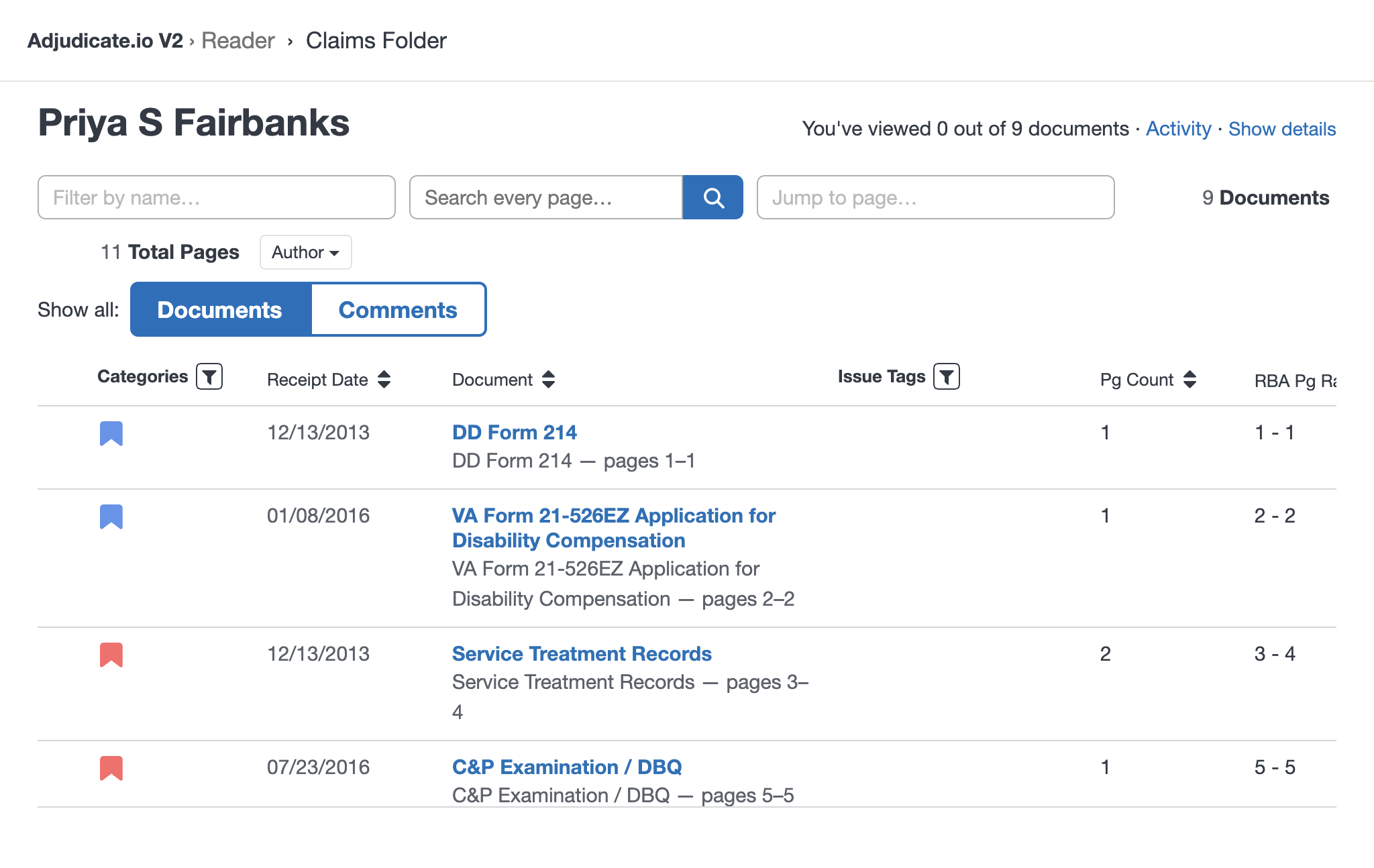
Shown on a fully synthetic claims file — no real veteran data.
Find anything, in seconds.
One query searches every page of every document in the appeal — and lands you on the exact page.
However big the file, it opens instantly.
Hundreds to thousands of documents per appeal, opened with no wait — any document on screen in under a second.
Know what you're looking at.
Issues, exhibits, parties, and receipt dates are how the record is organized. Not labels bolted onto a PDF.
Work the evidence.
Annotate, highlight, and cross-reference in place — your notes stay with the record.
In a PDF you get this jumble of things. Adjudicate is a far more ordered process — you can sort, pull them by receipt date, and know exactly where documents start and end.
02AI
Reads the file. Suggests into the work.
A layer over the whole record. Every output is a suggestion a reviewer accepts, edits, or rejects. Each one stays as an auditable record.
Consolidate the issues.
Reads the file and pulls every adjudicated issue into one unified list.
Flag what's relevant.
Surfaces the documents and pages that matter most for review.
Generate the tasks.
Scans new filings, identifies actionable ones, and creates the work each requires.
Group related records.
Associates attachments and supplements with their submission as a single record.
03The platform
One configurable product, on one record.
Beyond the Reader and its AI, the same core carries the whole case — government or commercial. Configuration, not a per-customer build, makes it your operation.
Authoring
Compose the brief or decision from the issue list — every citation tied to the page it came from.
Docket
The work engine — typed task trees, role-targeted queues, tunable distribution, deadlines and escalation.
Sessions
Schedule and hold hearings; audio and transcript land on the case as citable evidence.
Reporting
Live dashboards over the whole lifecycle; ad-hoc queries and export to the BI tool you already use.
Access
Roles mapped to capabilities, record-level access control, and identity you integrate or the platform provides.
Admin
Case types, workflows, queues, rules, and boilerplate are settings an administrator changes — not a developer release.
Connect
Vendor-neutral ports plus a typed REST/SDK API — the same interface drives live integration and bulk migration.
Record
One case-partitioned, append-only system of record — searchable, exportable, retained, isolated by design.
Proven on a real caseload. Built for any operation.
Adjudicate has run in continuous production for eight years at a veterans-law firm — shaped every day by the attorneys who work real cases on it. It'sone configurable platform in two editions — Counsel(for firms) and Docket (for adjudicating bodies): the same core whether you represent a case or decide it, government or commercial, made specific by configuration rather than a per-customer build.
Two editions, one core
Built for both sides of the decision.
One Adjudicate, configured for each side — the firms and representatives who argue cases, and the agencies, boards, tribunals, courts, and review operations that decide them.
See it on a real case file.
A working product, in production today. Ask for a walkthrough.
Request a demo